DX-888 High Sensitivity TEF6686 Radio — Full Review & Guide

The DX-888 is a high-sensitivity portable radio developed by ARESQ, built around NXP's automotive-grade TEF6686 DSP chip. It combines excellent selectivity, ultra-high sensitivity, and a rich feature set powered by an ESP32 microcontroller with a 2.4-inch touch screen.
1. Product Introduction
DX-888 is a high-sensitivity radio developed by ARESQ based on NXP's high-performance automotive-grade TEF6686 chip, featuring excellent selectivity and ultra-high sensitivity. As an automotive DSP tuner, it integrates a wide range of functions and advanced algorithms (CEQ, EMS, iMS, PACS, noise canceller, etc.), along with SDR (software-defined radio) signal processing. It offers significant advantages in handling multipath interference, adjacent frequency interference, weak signals, and noise cancellation.
Built on PE5PVB's open-source project TEF6686_ESP32, the DX-888 supports abundant advanced features beyond basic radio listening, including:
- Almost all RDS (Radio Data System) data display (requires local radio support)
- Automatic/manual station scanning
- Squelch function
- Battery voltage display
- Changeable themes and multilingual support
- Station presets
Redesigned with reference to mature TEF6686 front-end receiving circuits, the DX-888 is equipped with a 2.4-inch resistive touch LCD color screen, ensuring portability while displaying rich RDS information. A virtual numeric keypad is added for quick frequency input, and a large-capacity 1000mAh battery enables longer standby time.
2. Basic Parameters
2.1 Core Components
| Component | Specification |
|---|---|
| Radio Chip | NXP TEF6686HN/V102 (Chip Model F8602) |
| Main Control Chip | ESP32-WROOM-32U, 4MB Flash, Wi-Fi + Bluetooth dual-core module |
| Display Technology | 2.4-inch LCD screen, 320x240 resolution, IPS full-viewing angle, resistive touch |
| Control Method | Default: knob tuning; Supports third-party 9341 touch screen firmware |
2.2 Frequency Range
| Band | Frequency Range | Applicable Regions/Scenarios | Step Size |
|---|---|---|---|
| FM | 65-108MHz | Russia/Eastern Europe | OIRT default: 30kHz; FM optional: 50/100/200kHz (default 100kHz) |
| 76-95MHz | Japan | ||
| 76-108MHz | Campus broadcasting | ||
| 87-108MHz | Europe/Oceania/Africa/Asia | ||
| 87.5-108MHz | China/United States | ||
| SW | 1700-27000kHz | - | Default: 5kHz |
| MW | 522-1791kHz | - | Default: 9kHz/10kHz |
| LW | 144-513kHz | - | Default: 9kHz |
Note: DX-888 does not support the AIR band. The AIR band in the firmware requires an external downconverter (sold separately) for use.
2.3 Receiving Indicators
| Band | Telescopic Antenna Receiving Sensitivity | Selectivity |
|---|---|---|
| FM | ≤0.5uV (S/N=30dB) | ≥60dB (±150kHz) |
| SW | ≤10uV (S/N=20dB) | ≥60dB (BW=3kHz/±5kHz) |
| MW | ≤10uV (S/N=20dB) | ≥60dB (BW=3kHz/±9kHz) |
| LW | ≤10uV (S/N=20dB) | ≥60dB (BW=3kHz/±9kHz) |
2.4 Audio & Interface
| Feature | Specification |
|---|---|
| Antenna Interface | Full-band external antenna, standard SMA female connector |
| Speaker Output | TPA6211A1 amplifier chip, 4Ω/3W, low noise & distortion |
| Headphone Output | HT97220 amplifier chip, 3.5mm standard interface, independent dual amplifier design |
| Communication Interface | Built-in CH340 USB-to-serial chip, TYPE-C port |
2.5 Power & Dimensions
- Battery: 3.7V/1000mAh
- Current Consumption: Approximately 3.7V/120mA, usage time about 10 hours
- Dimensions: 50*82*20mm (excluding antenna connector and antenna)
- Weight: 103g (body only)
3. How to Operate
3.1 Basic Operations
| Control | Function | Operation Details |
|---|---|---|
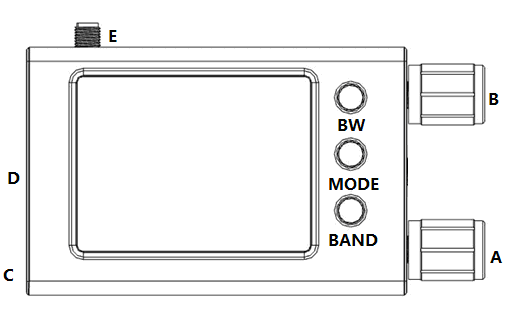
| TUNING Knob (B) | Frequency adjustment & step switching | Rotate: Adjust frequency; Short press: Switch steps; Long press: Lock/unlock |
| VOLUME Knob (A) | Volume adjustment | Rotate to adjust volume |
| SQL Gear | Squelch level adjustment | Refer to "Menu Description" for details |
| BW Button | Bandwidth selection & shortcut page | FM mode: Short press to switch stereo/mono; AM mode: Short press to switch bandwidth (3/4/6/8kHz); Long press: Open shortcut page (short press to exit) |
| MODE Button | Tuning mode & menu | Short press: Switch MAN (manual)/AUTO (auto search)/MEM (store); Long press: Open menu (short press to exit) |
| BAND Button | Band selection & virtual keypad | Short press: Switch LW/MW/SW/FML(OIRT)/FM; Long press: Open virtual keypad (short press to exit); Press & hold 3s+: Sleep/turn off screen |
3.2 How to Store a Station
- Tune to the target station.
- Toggle the MODE button until "MEM" is highlighted.
- Press the TUNING Knob; "MEM" turns red.
- Select the desired memory channel (red = frequency stored; green = no frequency stored).
- Press the TUNING Knob again to confirm storage.
3.3 Advanced Operations
| Function | Operation |
|---|---|
| Change encoder direction | Press and hold the BW button when powering on |
| Rotate the screen | Press and hold the MODE button when powering on |
| Restore default settings | Press and hold the BW + TUNING Knob when powering on |
| Select standard/optical encoder | Press and hold the TUNING Knob when powering on |
| Virtual keypad | Number keys 0-9: Input frequency; DX button: Quick save/delete (long press to scan); Enter key: Toggle step/confirm input |
4. Main Interface and Icon Meanings
4.1 Interface Overview
The main interface displays: Frequency, tuning mode (MAN/AUTO/MEM), band (FM/LW/MW/SW), bandwidth (AUTO BW), signal strength, RDS information (PTY/PS/PI/RT), battery voltage, time/date, and squelch status.
4.2 Key Icons & Touch Operations
| Icon/Display Item | Meaning | Touch Operation |
|---|---|---|
| Frequency deviation status | Indicate frequency deviation | Enter/exit still screen mode |
| Stereo/mono indicator | 2 circles = stereo; 1 circle = mono | Switch stereo/mono mode |
| Mute indicator | Highlight = muted | Enter/exit mute mode |
| RDS icon | Bright = RDS demodulation successful | Enter/exit advanced RDS view |
| AUTO BW | Demodulation bandwidth setting | Turn auto bandwidth on/off |
| WIFI icon | WIFI function status (under development) | - |
| Battery voltage/percentage | Battery status | Enter/exit screensaver mode |
| Signal strength value (e.g., 43.3) | Current signal strength | Left half: Open shortcut page; Right half: Open menu page |
| SQ: OFF | Squelch level (OFF = disabled) | Touch to activate adjustment (label turns green) |
| Sleep mode indicator | Sleep mode status | Turn sleep mode on/off |
| C/N (e.g., 32dB) | Carrier-to-noise ratio | - |
| PTY: Light Classical | RDS Programme Type | - |
| PS | RDS Programme Service Name | Left half: Turn down; Right half: Turn up |
| PI | RDS Programme Identification | Switch display: PI/time/date+time |
| RT | RDS Radio Text | Switch display: RT/debug information |
5. Menu Description
5.1 Menu Operation
- Open: Long press the MODE button
- Exit & Save: Short press the MODE button or click the yellow font area
- Select: Rotate the TUNING Knob or click the menu item directly
- Confirm: Short press the TUNING Knob
Note: Black font = Simple mode menu; Red font = Advanced mode additional menu.
5.2 Menu Categories & Settings
5.2.1 Main Settings
- Model selector: Portable touch/Base/Portable
- Set FM band: FM/FML/None
- Set AM band: LW/MW/SW/AIR/None (multiple combinations)
- Screensaver time: Off/3 Sec/10 Sec/30 Sec/60 Sec
- Screensaver options: Screen off/1% brightness/25% brightness/50% brightness
- System usage mode: Simple mode/Advanced mode
- Set first page: Main page/Open menu/Virtual keypad/Shortcut page/Advanced RDS/AF Screen
- Power Off timer: Off/1-480 minutes (adjustable)
- Dynamic SPl speed: Default 55MHz (5-70MHz adjustable/Auto)
- Auto still screen: Off/On
- Still screen timer: 0-120 seconds (adjustable)
- Power off: BW key to reopen
5.2.2 Audio Settings
- Set volume: -60dB to +24dB (TEF6686 internal DAC, default 0dB)
- Beep at band edge: Off/On
- Audio output: Stereo/MPX
- Stereo threshold: Off/30-60dBuV (adjustable)
- High cut corner: 1500-7000Hz (adjustable)
- High cut threshold: Off/20-60dBuV (adjustable)
- FM deemphasis: 50us/75us/Off
- Use squelch: On/Off/Auto
5.2.3 Display Settings
- Language: English/简体中文
- Set contrast: 1%-100% (continuously adjustable)
- Signal meter: On/Off
- Signal refresh interval: 30-1000ms (adjustable)
- Signal meter unit: dBuV/dBf/dBm
- Battery options: Show voltage/Show percentage/Off
- Battery correction offset: Adjust voltage display offset
- Modulation meter: On/Off
- Theme: Essence/Cyan/Crimson/Monochrome/Volcano/Dendro/Sakura/Whiteout/Tangerine/Ocean/Indigo/Maroon/Chinese Red/Retro/GoldBrite
- Frequency font: Aura2/Comic/Modern/Classic/Roubenstil/Motoya
- Flip screen display: Click to flip
- Invert screen color: Click to invert
- Set UI round: Modify menu display style
- Color bar display mode: New/Classic
- Show system clock: On/Off
- Clock display mode: Time only/Date + Time
- Time display format: 24 Hour/12 Hour
- Show debug info: Off/On
5.2.4 RDS Settings
- Show RDS errors: Small/Large/All/Off
- Region: Europe/USA(DB)/USA/Canada
- RDS Show underscore: Off/On
- RDS filter: On/Off
- Show PI errors: Off/On
- Use AF: Off/On/REG On/On/REG Off
- RT buffering: On/Off
- Auto sort AF: On/Off
- Fast PS: Initial/Always/Off
- Show RDS clock: On/Off
- Show long PS: On/Off
- Disable all RDS: Off/On
5.2.5 FM/AM Settings
FM Settings
- Set converter offset: MHz (adjustable)
- Set low band edge: Minimum 65MHz
- Set high band edge: Maximum 108MHz
- Set level offset: -25 to +15dB (adjustable)
- Set low level threshold: -15 to 30dBuV (adjustable)
- Softmute FM: Off/On
- FM Noise blanker: Off/50%-150% (adjustable)
- FM default step size: 100kHz/200kHz/50kHz
- FM AGC: 92-84dBuV (adjustable)
- FMSI stereo improve: Off (only for 6687/6689 chips)
- Set FML band: 65-74MHz/76-87MHz
AM Settings
- Soft mute AM: On/Off
- AM RF Level Offset: -50 to +15dB (adjustable)
- Show SW wavelength: On/Off
- CoChannel Detector sensitivity: Off/50%-150% (adjustable)
- CoChannel Detector counter: 1-15 (adjustable)
- AM ATT: Off/6dB/12dB/18dB/24dB/30dB/36dB
- AM AGC: 94-102dBuV (adjustable)
- MW default step size: 9kHz/10kHz
- AIR band Conversion: 81-135MHz (programmable)
- AIR start frequency: 118MHz/108MHz
5.2.6 Connectivity Settings
- USB mode: XDRGTK/RDS Spy
- Wi-Fi active: Off/On
- Configure Wi-Fi: Connect to radio hotspot for setup
- Stationlist client IP: Customizable
- Stationlist ID: 1-10 (adjustable)
- Screen off on XDRGTK: Off
- Wi-Fi auto disconnect: Disable/1-1440 minutes (adjustable)
- Bluetooth active: Off
5.2.7 Frequency Scanning & Auto Search
Frequency Scanning
- Start DX scanning: Click to start
- Scanning band: FM/LW/MW/SW/AIR/Default/FML
- Begin/End channels: Customizable
- Wait time: Set scan interval
- Scanning method: Exclude/Only
- Auto cancel mode: Signal/Off/Correct PI
- Cancel scan mode: Stay/Break
- Mute while scanning: On/Off
- Screen off while scan: On/Off
Auto Search
- Start Auto search: Click to start
- Search & save mode: Overwrite/Append
- Search band: FM/LW/MW/SW/AIR/FML
- FM sampling times: 1-30 (adjustable)
- FM multipath limit: Configurable
- FM scan sensitivity: 1-15 (adjustable)
- AM sampling times: 1-30 (adjustable)
- AM sampling hold: 10-1000ms (adjustable)
- AM scan sensitivity: 1-20 (adjustable)
- Judgement mode: Quality priority/Quantity priority
- Save bandwidth: Default/Current
- Mute while search: Off/On
- Screen off while search: Off/On
- Save begin channel: 1-99 (adjustable)
- SW search start/stop: 1800-27000kHz (adjustable)
- Arrange stations: Defrag and sort/Only defrag
- Delete stations: Click to delete
5.2.8 Operation Settings
- Menu display style: New(Vertical)/New(Horizontal)/Classic
- Quickly switch menu: On/Off
- Touch Type: Int33/Int27/Off/Poling
- Touch calibration: Click to start
- Touch interval: Default 300ms (adjustable)
- How to use rotary: Classic/New
- Rotary adjust squelch: On/Off (use TUNING knob to adjust threshold when on)
- Screen off rotating: On/Off
- Reverse rotary: Click to change direction
- Variable rotary speed: Fast/Off/Medium
- Long press Rotary key: Lock&Unlock/Original operation/Open menu/Virtual keypad/Shortcut page/Advanced RDS/AF Screen
- Long press BW key: Shortcut page/Advanced RDS/AF Screen/Lock&Unlock/Original operation/Open menu/Virtual keypad
- Long press Mode key: Original operation/Open menu/Virtual keypad/Shortcut page/Advanced RDS/AF Screen/Lock&Unlock
5.2.9 Other Settings
- Set date/time: Configure year/month/day/hours/minutes/seconds
- Set local time zone: Adjust time zone offset
- NTP time sync: On/Off
- RDS time sync: Off/On
- Delete RDS dictionary: Click to delete
- System information: Display memory usage
- Restore Defaults: Factory reset
- Firmware Version: Show current version
5.2.10 My Settings
- My ATS scheme: Edit/search custom ATS schemes
- Using ATS scheme: Select scheme for search
- My Scan scheme: Edit/search custom Scan schemes
- Using Scan scheme: Select scheme for scanning
- My favorite theme: Set 4 themes for automatic change
- My receive plan: Edit/custom receive plans
- Using receive plan: On/Off
- My Shortcut icon: Customize shortcut icons
- Save my settings: Click to save
- Restore my settings: Click to restore
6. Charging Instructions
- Charging Port: TYPE-C
- Charging Requirements: 5V voltage, 1A+ current charging head (maximum 5W power; fast charging not supported)
- Recommended Operation: Charge with the device turned off
- Charging LED Indication: Red = Charging; Off = Fully charged
7. Package List
- Host ×1 (with 3.7V/1000mAh lithium battery installed)
- High-quality telescopic antenna (SMA connector) ×1
8. Firmware Upgrade
- Connect the radio to a computer using the included TYPE-C data cable; a new COM port will appear in the computer's Device Manager.
- Turn on the radio.
- Download the latest firmware.
- Follow the firmware upgrade guide to complete the update.
Driver: If the COM port is not recognized, install the CH340/CH341 USB-to-serial driver from WCH: https://www.wch-ic.com/downloads/CH341SER_EXE.html